
August 4, 2026 at 5:14 AM
The in-game World Map is now live on both Old ClassicKBD and New ClassicKBD.
Update your client through the launcher, then open the map in-game.
How to open it
- Click the Map button under the minimap / radar
- Or type ::map in chat
- (::webmap still opens the website map page if you want that)
What it shows
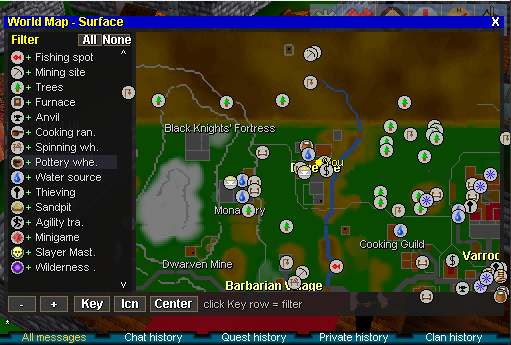
- Full world map with pan, zoom, and your You marker
- City and landmark names (Edgeville, Falador, Varrock, guilds, and more)
- Points of interest: banks, shops, mining, trees, fishing, combat training, quest starts, auction house, makeover mage, and other useful pins
- Click an icon for details (name, type, coordinates)
- Filter panel (Key): toggle icon types on/off, or use All / None / Icn master toggle
- Same filter also applies to icons on the minimap
Worlds
- Works on Old and New — each world uses its own object/NPC data so pins match that server
More fine-tuning updates are planned (calibration, pin density, extra landmarks, etc.).
Thanks for playing — see you on the map.
Update your client through the launcher, then open the map in-game.
How to open it
- Click the Map button under the minimap / radar
- Or type ::map in chat
- (::webmap still opens the website map page if you want that)
What it shows
- Full world map with pan, zoom, and your You marker
- City and landmark names (Edgeville, Falador, Varrock, guilds, and more)
- Points of interest: banks, shops, mining, trees, fishing, combat training, quest starts, auction house, makeover mage, and other useful pins
- Click an icon for details (name, type, coordinates)
- Filter panel (Key): toggle icon types on/off, or use All / None / Icn master toggle
- Same filter also applies to icons on the minimap
Worlds
- Works on Old and New — each world uses its own object/NPC data so pins match that server
More fine-tuning updates are planned (calibration, pin density, extra landmarks, etc.).
Thanks for playing — see you on the map.